Now Live — Intelligent Workforce Management

Schedule Smarter.
Manage Every Shift,
24 / 7.

ShiftManager 247 is the all-in-one platform for intelligent workforce scheduling, real-time shift tracking, SMS notifications, and seamless team communication — built for care and service organisations.

24/7
Real-Time Access
SMS
Instant Notifications
3
User Roles
100%
Web-Based
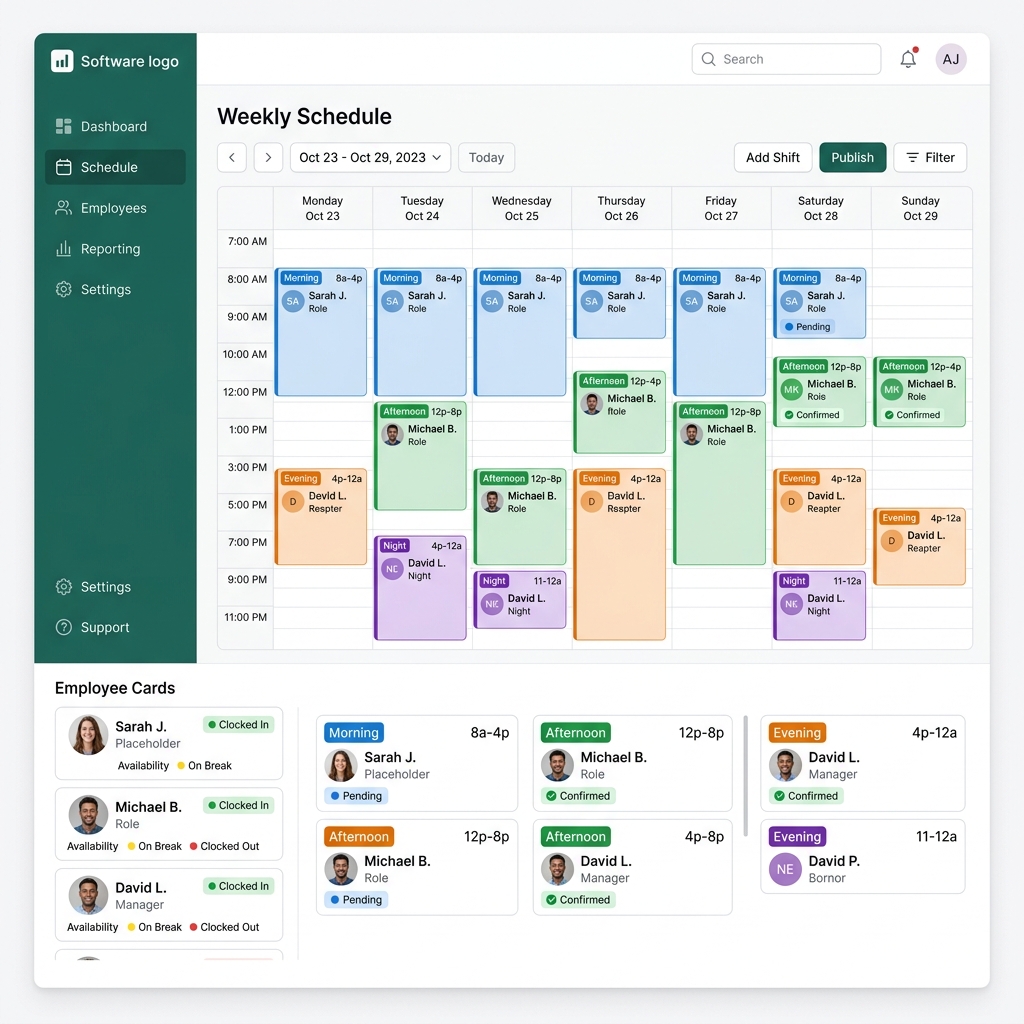
ShiftManager 247 Dashboard

Everything you need to run
a flawless shift operation

From scheduling to clock-out, ShiftManager 247 covers every step of your workforce workflow with intelligent automation.

Smart Calendar & Planner

Day, week, and month views with drag-and-drop shift management. Filter by employee, location, position, client, and assignment status. Conflict detection built-in.

SMS & Email Notifications

Automatically notify employees about new shifts via SMS. Accept or decline directly from the message — no login needed. Configurable countdown timers per shift.

GPS Clock In / Clock Out

Employees clock in with precise GPS coordinates captured automatically. Retrospective time adjustments available. Clock out requires a shift summary and optional photo.

Shift Marketplace

Employees post shifts they can't cover. Colleagues pick them up from a live marketplace feed. Managers approve swaps before they take effect — full accountability maintained.

Timesheet & Reports

Detailed timesheet reports for every employee with hours worked, location, position, and client. Export-ready data for payroll and compliance needs.

Recurring Shift Templates

Define standard work hours per employee. The system projects recurring shifts on the calendar automatically, flagging gaps and missing assignments before they become problems.

Team Unavailability Tracking

Employees submit unavailability windows. Managers see these blocks directly on the schedule calendar, preventing conflicts when assigning shifts.

Multi-Role Access Control

Separate dashboards for admins, managers, and employees. Each role sees only what's relevant — from full system control to personal shift cards with one-tap actions.

SOP AI Chatbot

An intelligent assistant trained on your organisation's standard operating procedures — helping employees get answers fast without waiting on management.

One platform, three powerful portals

Every user gets a tailored experience. No feature overload, no confusion — just the right tools for the right person.

Administrators

Full system control with organisation-wide visibility

  • Create and manage all employees, locations, positions, and clients
  • Full calendar access across all locations and managers
  • Approve or reject marketplace swap requests
  • Access organisation-wide timesheets and reports
  • Configure SMS timer durations and system settings
  • Import employees via CSV in bulk
  • Upload and manage company logo and branding

Managers

Focused control over your assigned team

  • Create, edit, and publish shifts for your team
  • View calendar for your assigned employees only
  • Approve or reject shift swap requests
  • Clock in employees directly from the dashboard
  • Monitor pending marketplace requests in real time
  • Access timesheet reports for your team

Employees

A clean, mobile-friendly portal for daily work

  • Accept or decline shifts via SMS link — no login needed
  • View upcoming, today's, and past shifts in list or calendar view
  • Clock in and out with GPS location capture
  • Submit clock-out summaries with photo attachments
  • Browse the shift marketplace to pick up extra shifts
  • Submit availability blocks and time-off requests

From shift creation to clock-out
in four simple steps

1

Create the Shift

Admin or manager creates a shift on the calendar — specifying date, time, location, position, and client.

2

Notify via SMS

The system sends an instant SMS to the assigned employee with a secure accept/decline link — no app download required.

3

Clock In with GPS

On shift day, the employee taps Clock In from their dashboard. Their location is automatically captured and recorded.

4

Complete & Report

Clock out requires a written shift summary and optional photo. Timesheet data is instantly available for manager review.

Every module you need,
all in one place

Schedule Calendar

Full-featured week, day, and month views with real-time shift data and inline editing.

Employee Dashboard

Personal portal for employees with shift cards, status tracking, and one-tap clock actions.

Marketplace Requests

Open shift board where employees post and claim shifts, with manager approval workflow.

Timesheet Reports

Detailed hours worked per employee, per location — filterable and export-ready.

Shift Templates

Save recurring shift patterns and assign them to employees across multiple days at once.

Locations & Clients

Manage multiple locations and link clients to specific sites for detailed reporting.

Positions Management

Define job roles and positions. Employees are matched to shifts based on their qualified roles.

Messaging

Internal messaging system for direct communication between managers and their teams.

Secure Authentication

Role-based login with password hashing, forgot-password email flow, and session management.

Smart Notifications

SMS via Twilio plus email queues — ensuring every shift notification gets delivered reliably.

Unavailability Calendar

Employee-submitted time-off blocks visible to managers directly on the scheduling calendar.

AI SOP Assistant

Chatbot trained on your organisation's procedures — answers employee questions instantly, 24/7.

Ready to take control of your schedule?

ShiftManager 247 is live and ready. Sign in to your organisation's portal or contact us to get started today.

Access Your Portal